“Your plan has a stake and the page hasn’t.”
Planned, read, and the difference
Say what a scene is for, then write it. Kolophon holds the two side by side at every level, from the story to the beat, and tells you in a sentence where they part.
A writing app for novelists
Kolophon is a writing desk built on a craft system. Your plan, your pages, your world and your revision live in one place — and it shows you what every scene is doing, so you always know what to work on next.
For Mac, iPad and iPhone. One email when it’s ready — nothing else.

The middle
Somewhere past the first act the shape slips away. A question you promised the reader goes unanswered. Three scenes in a row move at the same speed. The plot lives in one app, the people in another, the notes in a third. A word processor can’t see any of it. It only knows words.
“I think you are right in feeling a certain slight sagging in chapters six and seven, and I don’t know how to suggest a remedy.”
Even Gatsby sagged. Fitzgerald found the cure in the proofs. Kolophon helps you find yours while you’re still writing — and The Great Gatsby is the sample book it opens with.
Only in Kolophon
Other writing apps hold your scenes. Kolophon knows what each one is for — and tells you when the page isn’t doing it.
“Your plan has a stake and the page hasn’t.”
Say what a scene is for, then write it. Kolophon holds the two side by side at every level, from the story to the beat, and tells you in a sentence where they part.
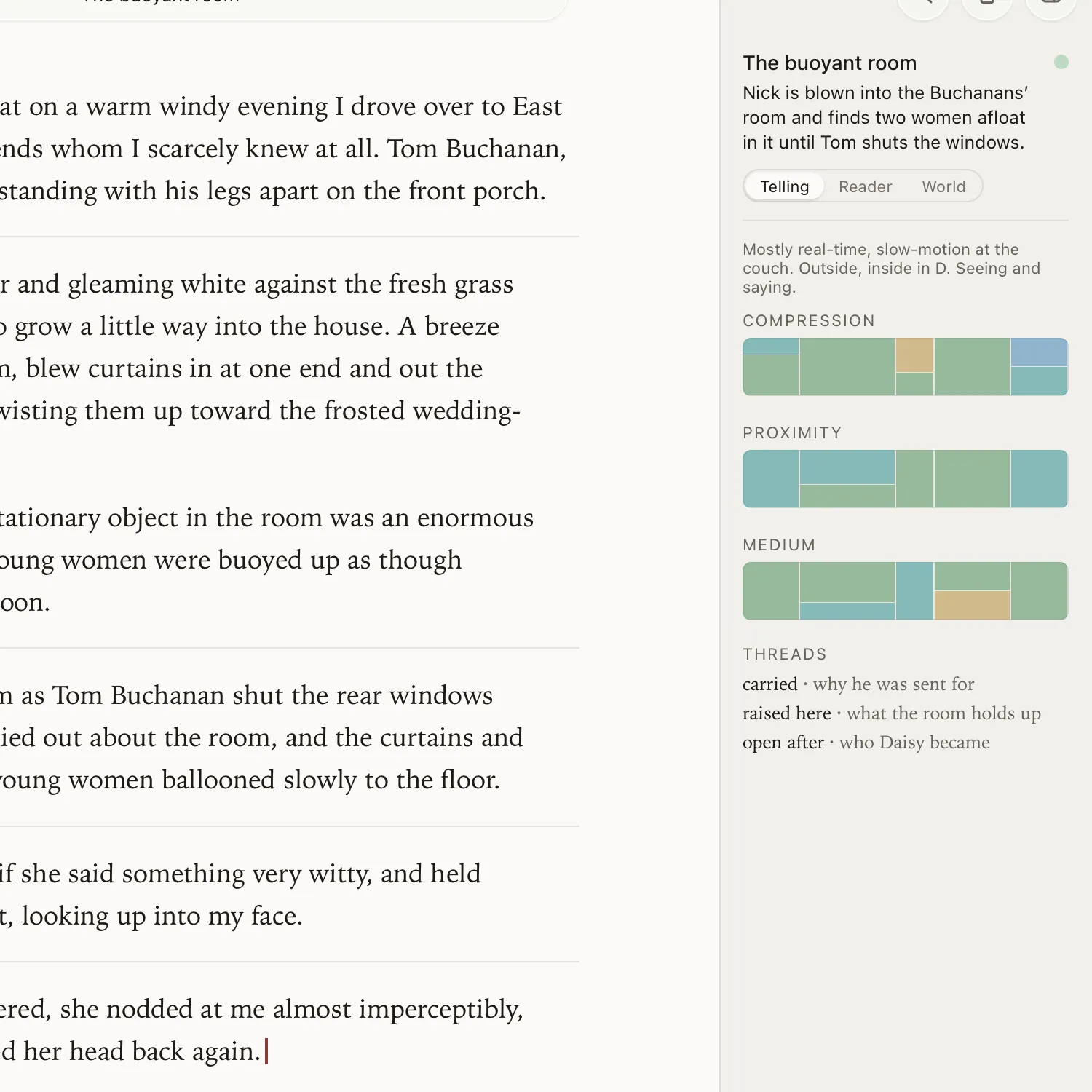
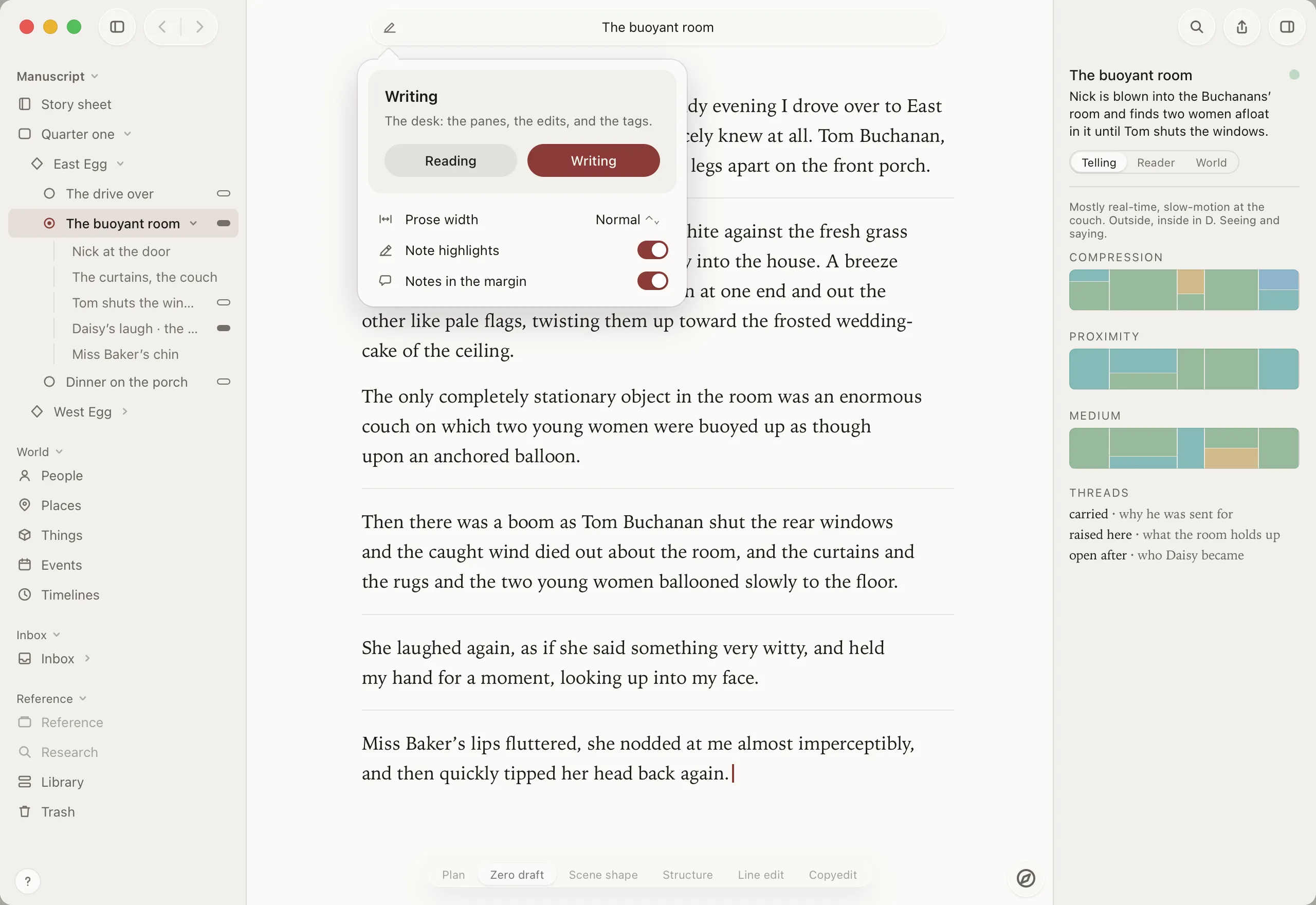
“Mostly real-time, slow-motion at the couch.”
How much page the time gets, whose eyes we’re behind, what the sentences are made of, how much is shown and how much told — read straight from your paragraphs, by rule, as you type.
“Raised here · what the room holds up.”
Every question you plant is a thread the reader carries. Mark where each is raised and answered, and Kolophon weighs them across the book — so the ones left hanging can’t hide.
“Wave 2 · Scene shape.”
Plan, zero draft, scene shape, structure, line edit, copyedit. Each pass shows only its own checks, so a first draft is never judged like a final one — and you always know which pass you’re on.
“Who the page names, against who you planned.”
Kolophon reads which characters and places your prose actually names, and shows you where that disagrees with your plan for the scene — the guest who never arrives, the room you forgot you left.
“Was · now.”
A note keeps what the reader knew at that point in the book when you wrote it. Come back months later and see what has changed since — not just the words, the story around them.
| A word processor | A manuscript app | Kolophon | |
|---|---|---|---|
| Chapters and scenes you can move | Partly | Yes | Yes |
| Cards, outline and plan of the same book | — | Partly | Yes |
| What each scene is for: want, turn, outcome | — | — | Yes |
| The plan checked against the page | — | — | Yes |
| Pacing and point of view read off the prose | — | — | Yes |
| The reader’s open questions, across the book | — | — | Yes |
| People, places and events tied to their scenes | — | Partly | Yes |
| Your story’s own calendar, told order and true order | — | — | Yes |
| Revision tasks pinned to the line | — | — | Yes |
| Every change kept, nothing ever deleted | Partly | Partly | Yes |
A look around
See the shape
Every scene has a want, a turn and an outcome. Plan it, write it, and the inspector shows where the two part company: the stake your plan promised that the page never delivers, the question raised and never answered.
Every level of the book
Your book is one structure — story, acts, scenes, beats — and you move up and down it with the compass, or across it from the prose to the cards to the plan. Move a scene and the book moves with it.
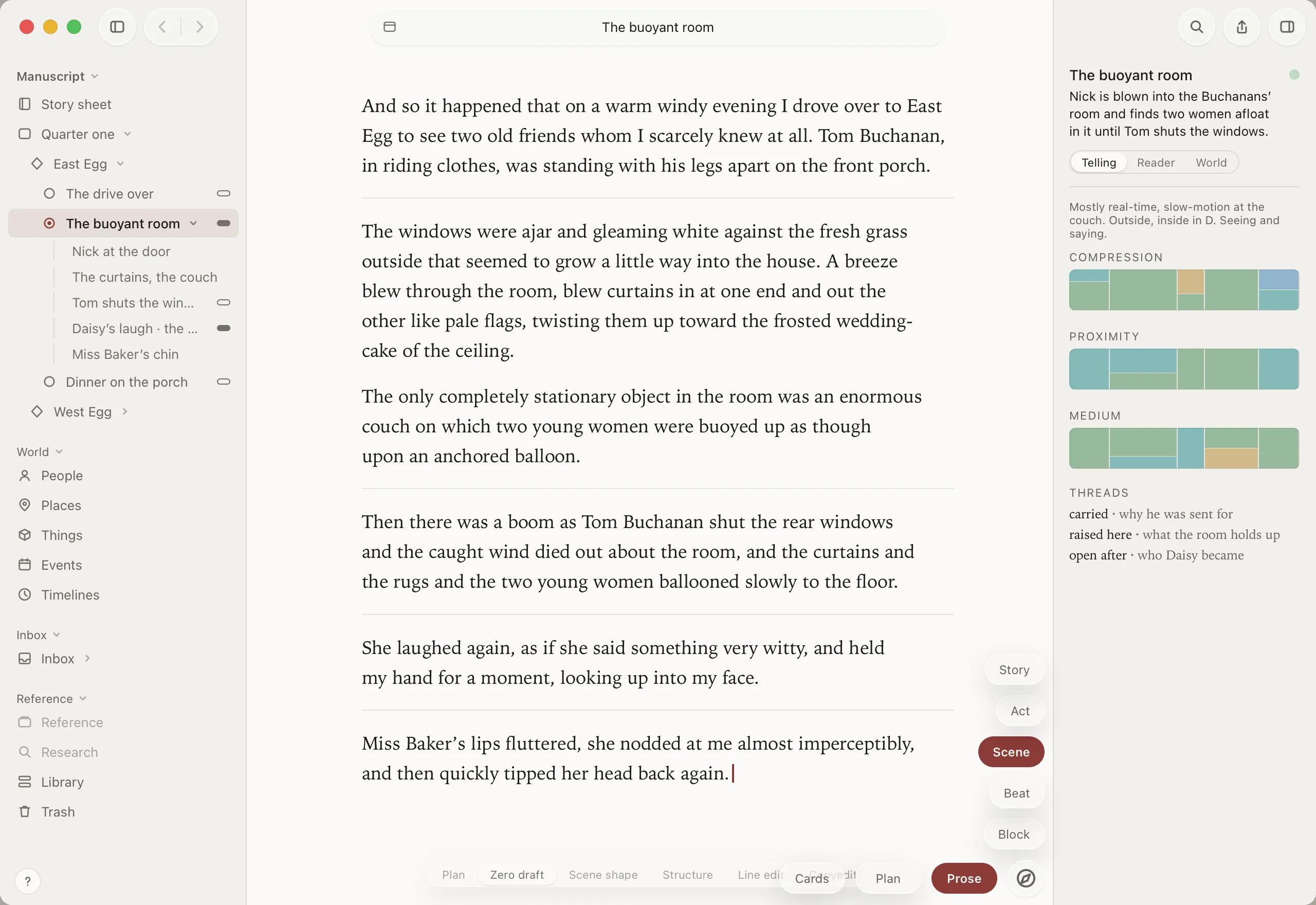
Notes where they belong
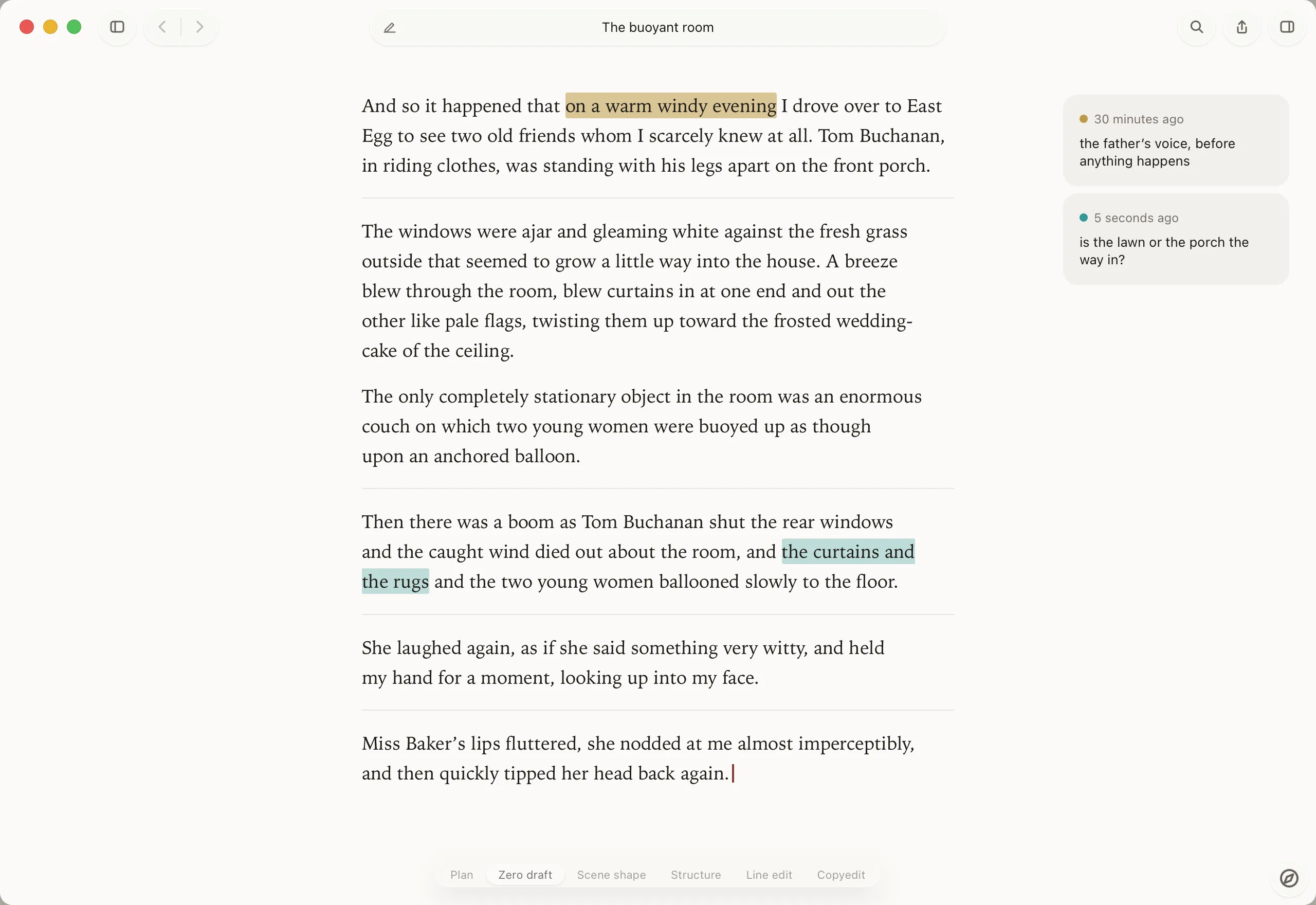
Highlight a phrase and say what’s wrong with it. The note sits in the margin beside the line, in a colour that means what you decide, and it finds its words again even after you’ve rewritten around them.
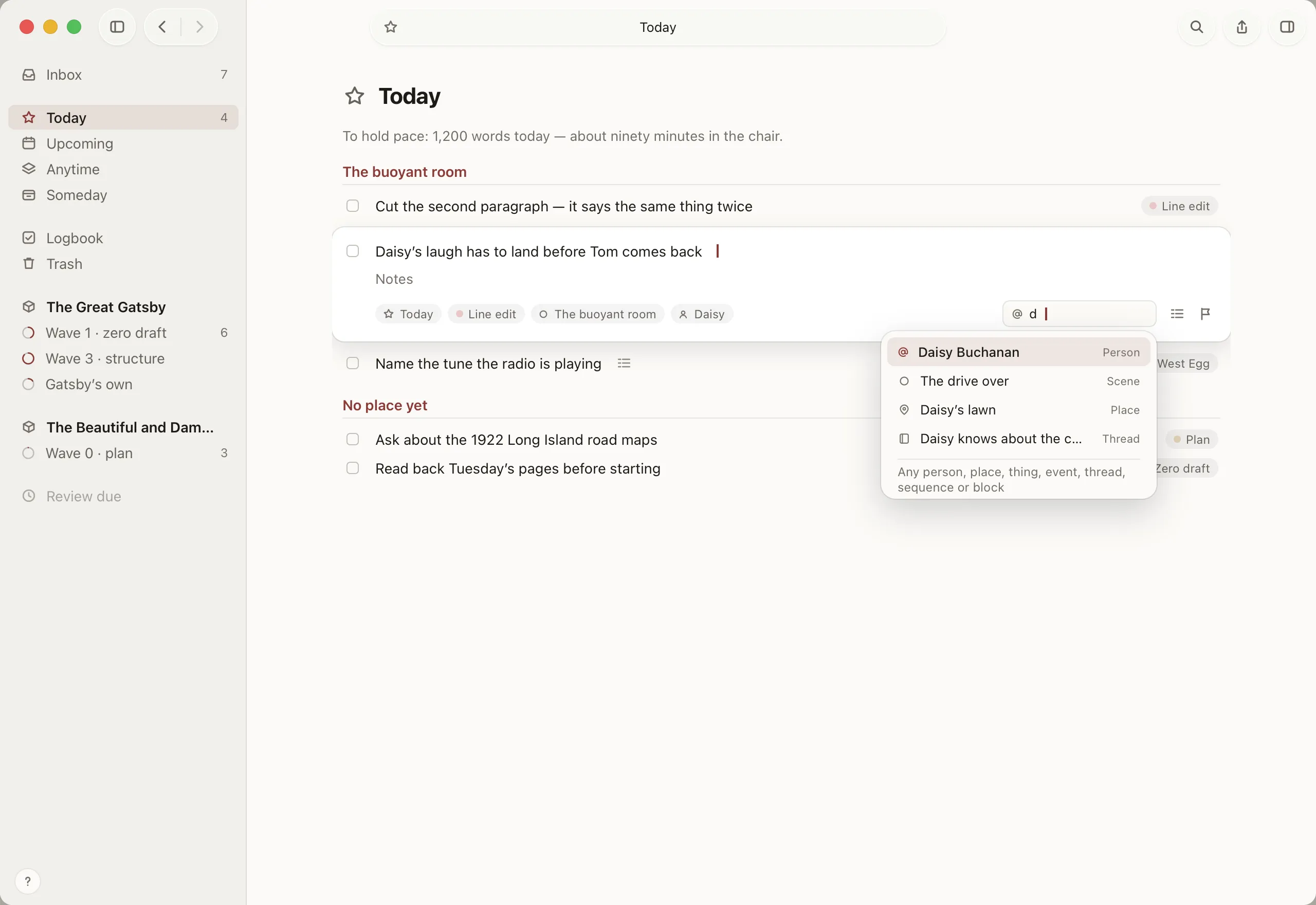
Revision you can finish
Notes, findings and loose ideas land in an Inbox. Turn them into tasks, link them to the scene, the character or the thread they’re about, and plan your week with Today and Upcoming — a task manager in the spirit of Things, built for a book.
The writers who went before
Anthony Trollope · the daily draft
He wrote “with my watch before me,” requiring of himself “250 words every quarter of an hour,” three hours each morning before he went to work at the Post Office.
In Kolophon: focus sessions, and a pace set by your deadline.
Charles Dickens · the structure
He planned each monthly part on a folded sheet: questions to himself on the left, what he actually wrote on the right — answered later, often in a different ink.
In Kolophon: what you planned, what’s on the page, and the difference.
Jane Austen · the revision
She finished Persuasion, thought its ending “tame and flat,” and wrote two new chapters. The cancelled draft survives at the British Library.
In Kolophon: every version kept. Nothing is ever deleted.
Your work
Kolophon’s assistant runs on Apple Intelligence, on your own device. Your manuscript is never uploaded, and never used to train anything.
It can read a scene back to you, ask what it’s for, and tidy your punctuation. The sentences are yours — and you can switch it off for a whole book.
Every change is a step you can take back. A deleted scene goes to the Trash, not away, and any moment of the last week is one click from being the present again.
Your story lives in open files on your own disk, and exports as EPUB, Word, PDF and Markdown, set by templates you can make your own.
One desk
Most novels are kept across half a dozen apps that know nothing about each other — about $530 of them in the first year.
Scrivener for Mac and iOS, OmniOutliner 6 Pro, Things 3 for Mac, iPad and iPhone, Miro Starter, Notion Plus, Obsidian Sync and Bear Pro, for one writer at US prices in October 2026.
Made for the Mac, the iPad and the iPhone
Kolophon is built with Apple’s own frameworks, so it feels like the rest of your Mac: the keyboard for everything, ⌘K to go anywhere, a reading mode and a writing mode, each with its own setup. Write and plan on the Mac and iPad. Capture ideas and read back on the iPhone.
Questions
Kolophon is in development. Leave your email and you’ll get one message, when it’s ready — no newsletter, no drip campaign.
The Mac and the iPad for writing and planning; the iPhone for capturing ideas, reading back and working through your tasks. One purchase covers all three.
One purchase, no subscription. The price will be on this page before launch.
Kolophon’s assistant doesn’t write your story, and you can switch it off entirely — for a whole project or a single manuscript. Everything else in the app works without it.
No. The assistant is the only part that uses it; the writing, the structure, the world, the tasks and the export all work on any supported device.
Write to us from the support page. A person reads every message.
They live on your own disk as open files, not in a database you can’t see into, and they export as EPUB, Word, PDF and Markdown whenever you like.
Kolophon
We’ll write once, when Kolophon is ready for your book.